
-
Instructor: Callaway Smith
Course: Virtual Level 1
Contact: Callaway.Smith@jtac787.orgInstructor: John Allamby
Course: Virtual Level 1
Contact: John.Allamby@jtac787.orgInstructor: Justin Tang
Course: Virtual Level 1
Contact: Justin.Tang@jtac787.org
Instructor: Elliot Cooney
Course: Virtual Level 1 Ottawa
Contact: Elliot.Cooney@jtac787.orgInstructor: Rembrandt MacLeod
Course: Virtual Level 1 Ottawa
Contact:Rembrandt.MacLeod@jtac787.orgInstructor: Joel Knapp
Course: Virtual Level 2
Contact: Joel.Knapp@jtac787.orgInstructor: Ryan Watkins
Course: Virtual Level 2
Contact: Ryan.Watkins@jtac787.orgInstructor: Denis Lishnievski
Course: Virtual Level 3
Contact: Denis Lishnievski@jtac787.orgInstructor: Vito Pilolli
Course: Virtual Level 3
Contact: Vito.Pilolli@jtac787.orgInstructor: Mark Mansingh
Course: Virtual Level 4
Contact Mark.Mansingh@jtac787.orgInstructor: Mike Walker
Course: Virtual Level 4
Contact: Mike.Walker@jtac787.org -
Canvas by Instructure is a web-based Learning Management System (LMS) used by educational institutions to manage digital education, course materials, assignments, and communication. It is a cloud-native platform that allows teachers to create courses and students to access learning resources, submit work, and take quizzes online.
-
Microsoft Teams is a cloud-based team collaboration platform developed by Microsoft and released in March 2017 as part of the Microsoft 365 suite. It serves as a centralized hub for chat, video conferencing, file storage, and application integration, designed to facilitate real-time communication and collaboration for organizations of all sizes.
-
Please visit these links to test your microphone and video.
https://devicetest.teams.microsoft.com/ -
Your instructor will admit you into the virtual classroom when the lesson is about to begin. 6:30pm is the typical start time.
-
You must sign in to Microsoft Teams using your email address. If you just clicked on the Microsoft Teams Link you join the virtual class anonymously so you will not have access to many features of Microsoft Teams including the Chat. This is by design. Below are instructions on how to setup your Guest access.
-
When you first click a Teams link, it will likely open in your browser. On the Teams start page that loads, select Always allow teams.microsoft.com to open links of this type in the associated app and then click Open or Open Microsoft Teams. This saves your preference so future links bypass the browser.
In Windows set your default app to Microsoft Teams.
Go to Settings / Default Apps
Find “Microsoft Teams” in the list.
Set them all to open with Microsoft Teams.
Start the default and restart your computer.
-
An external user will only have access to basic features. If you want the full virtual learning experience you will need to setup and sign in as a Guest.
The instructions on how to set up Guest user are below. -
Please email techsupport@jtac787.org
Monday - Friday 8am - 4pm
Please note:Tech Support will never ask to remote control/ log into your device.
Tech Support will never ask you for any payment.
Tech Support will never ask you for a password.
Tech Support will never cold call you to tell you that there's a problem with your device. Unless you contact us first, we won't call or email you to offer tech support.
Why become a Guest user to participate in a JTAC Virtual Class.
As a Guest user you will gain access to:
Participate in channel conversations and meeting chats.Access files shared within Teams and channels.Attend meetings and collaborate with internal users.Use apps and tabs
***As an External user (non Guest) you will only be able to participate in the Teams meeting. To setup your Guest access please follow the instructions below.
You will receive an email invitation from the Microsoft Teams Admin.  click ACCEPT
***If you have not received an email invitation please contact admin@jtac787.org
***Virtual training is only available for students enrolled into Virtual Training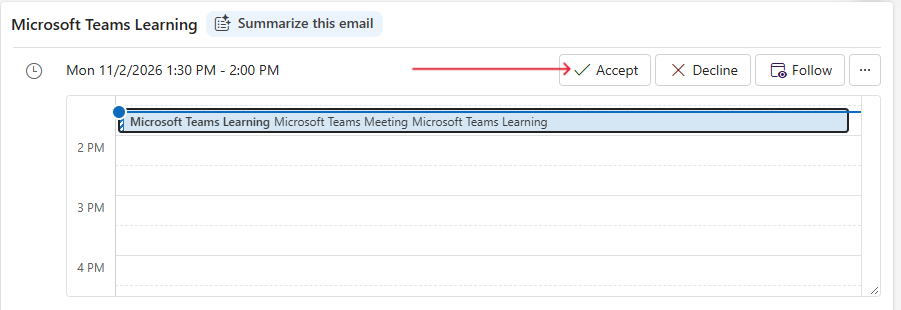
Signing into your Microsoft Teams Account.
To sign into your Microsoft Teams account please use the email address associated with your JTAC registration profile.
If you’re already using a work / personal Microsoft Teams account you will have to "switch the tenant" by clicking on your profile picture and choose “Joint Training and Apprenticeship Committee”. This allows you to become a Guest user in a JTAC Virtual Class. 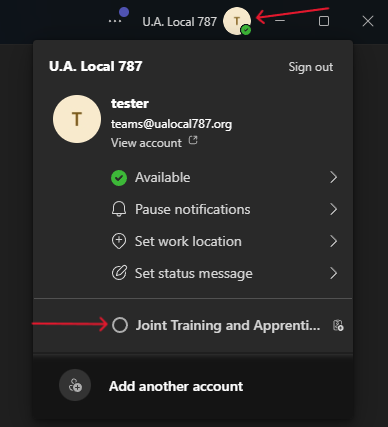
As a Guest participating in a JTAC Virtual Class you will gain access to:
Participate in channel conversations and meeting chats.
Access files shared within Teams and channels they're a member of.
Attend meetings and collaborate with internal users.
Use apps and tabs